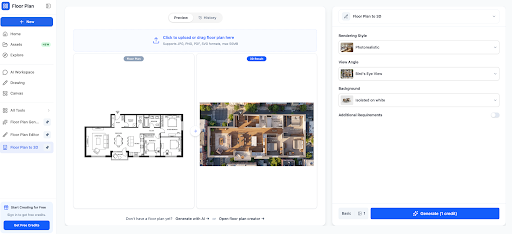

How to Create a 3D Floor Plan: A Complete Guide to Using a Floor Plan Generator from Image
Whether you are a homeowner planning a renovation, an interior designer pitching a concept, or a real estate agent preparing a listing, you have probably wondered how to create a 3D floor plan quickly and without expensive software. A flat 2D drawing shows walls and measurements, but it rarely helps people imagine how a space will actually feel. That is where 3D visualization changes everything. Today, thanks to AI-powered tools, a floor plan generator from image can turn a simple photo or sketch into a detailed, three-dimensional layout in just a few minutes.
Why It Is Worth the Effort to Create a 3D Floor Plan
When you create a 3D floor plan, you give yourself and your clients a realistic preview of the finished space. You can see ceiling height, furniture placement, room flow, and natural light before a single wall is built or a single piece of furniture is bought. This reduces costly mistakes, speeds up decision-making, and keeps everyone involved on the same page.
-
Better visualization: clients understand a 3D model far more easily than a flat blueprint.
-
Fewer errors: spotting layout problems early saves time and money during construction.
-
Stronger presentations: realistic visuals make proposals more convincing.
-
Faster approvals: when everyone can see the design clearly, decisions come sooner.
What Is a Floor Plan Generator from Image?
A floor plan generator from image is a tool that analyzes an uploaded picture, such as a scanned blueprint, a hand-drawn sketch, a real estate brochure, or a photograph of a printed plan, and automatically converts it into a clean, editable digital layout. Instead of redrawing every wall by hand, the software detects lines, rooms, doors, and windows, then rebuilds them as a structured plan.
Many modern platforms use artificial intelligence and computer vision to do this work. Once the 2D layout has been recognized, the same floor plan generator from image can often raise the walls, add floors, and place basic furniture to produce a full 3D model.
How a Floor Plan Generator from Image Works
Behind the scenes, the process usually follows three stages. First, the software cleans up the uploaded image by adjusting contrast, removing noise, and straightening the perspective. Second, it recognizes architectural elements such as walls, doorways, windows, and room labels. Third, it generates a digital model that you can edit, measure, and view in three dimensions.
Because the technology keeps improving, a good floor plan generator from image can now handle even rough sketches with surprisingly accurate results.
Step-by-Step: How to Create a 3D Floor Plan from an Image
-
Prepare a clear image. Use a well-lit photo or a high-resolution scan. Make sure the plan is flat, fully visible, and free from shadows or heavy creases.
-
Upload it to a floor plan generator from image. Choose a reliable platform, upload your file, and let the tool detect the walls and rooms automatically.
-
Review the detected layout. Check that every wall, door, and window has been identified correctly, and fix any small mistakes manually.
-
Set the scale and dimensions. Enter one known measurement, such as the width of a room, so the software can size everything accurately.
-
Convert the plan to 3D. With one click, most tools will extrude the walls and generate a three-dimensional view that you can rotate and zoom.
-
Add furniture, materials, and lighting. Place sofas, beds, and tables, then choose flooring, wall colors, and lighting to match your vision.
-
Export and share. Save your design as an image, PDF, or interactive link so clients, contractors, or family members can review it.
By following these steps, almost anyone can create a 3D floor plan in under an hour, even without a design background.
Tips for Getting the Best Results
-
Start with the highest-quality image you can find; clear lines lead to accurate detection.
-
Choose a floor plan generator from image that lets you edit the result, because no automatic tool is perfect.
-
Double-check measurements before you finalize the design, especially for renovation projects.
-
Experiment with different furniture layouts to find the most comfortable and functional arrangement.
-
Save multiple versions so you can compare design options side by side.
Who Can Benefit from These Tools?
Almost anyone who works with spaces can benefit. Homeowners can create a 3D floor plan to test renovation ideas before hiring contractors. Real estate agents can bring flat brochure layouts to life and attract more buyers. Architects and interior designers can speed up early concept work, while students and hobbyists can learn design principles without a steep software learning curve.
How to Choose the Right Tool
Not every platform is equal, so it pays to compare a few options. Ask whether the software lets you create a 3D floor plan with accurate measurements, whether it supports your preferred export formats, and whether its floor plan generator from image feature can handle low-quality scans or hand-drawn sketches. Free trials are especially useful, because they let you test the accuracy and ease of use before you commit.
Also consider the editing tools, the size of the furniture and materials library, and whether the platform works smoothly on both desktop and mobile devices.
Common Mistakes to Avoid
-
Uploading blurry, tilted, or low-resolution images, which confuses the detection process.
-
Skipping the review stage and trusting the automatic result without checking it.
-
Ignoring scale, which leads to rooms that look right but have the wrong proportions.
Conclusion
Planning a space no longer requires advanced drawing skills or expensive software. With the right approach, you can create a 3D floor plan that looks professional, communicates your ideas clearly, and helps you avoid costly surprises. A reliable floor plan generator from image does the heavy lifting by converting your existing sketches and scans into digital layouts, leaving you free to focus on creativity and design decisions.
If you are ready to turn your ideas into reality, start with a clear image, try a floor plan generator from image, and see how quickly you can create a 3D floor plan that brings your vision to life.
ort your content above to get started.