
The demand for custom merchandise is higher than ever. From personalized tumblers to branded office supplies, businesses and creators are constantly looking for ways to apply vibrant, durable designs to hard surfaces. UV DTF printing has emerged as a game-changer in this space, allowing for crystal-clear transfers without the need for heat pressing.
However, printing is only half the battle. The real bottleneck in production often occurs during the finishing stage: cutting. Trying to manually cut intricate designs or relying on standard vinyl plotters that struggle with the thickness of UV DTF film can slow operations to a crawl.
This is where the “smart workflow” comes into play. By pairing a high-quality UV DTF printer with a precision laser cutting machine, print shops can automate their production line, reduce labor costs, and achieve a level of detail that manual methods simply cannot match.
The Bottleneck: Cutting Through the Noise
UV DTF stickers are significantly thicker than standard vinyl decals because they consist of layers of ink, varnish, glue, and the film itself. Traditional blade cutters often struggle to cut through this stack cleanly. They can drag the material, cause tearing, or fail to cut deep enough, leading to wasted inventory and frustration.
Furthermore, manual cutting is time-consuming. If you are producing 500 branded decals for a corporate client, cutting them out by hand with scissors is not a viable business strategy.
The Smart Solution: Laser Integration
The integration of a laser cutting machine into your UV DTF workflow solves these issues instantly. Here is how the smart workflow operates:
1. Printing and Laminating
The process begins with the UV DTF printer. The machine prints the design with white ink, color ink, and a varnish layer. Many modern machines handle the lamination of Film A and Film B automatically inline.
2. Optical Recognition
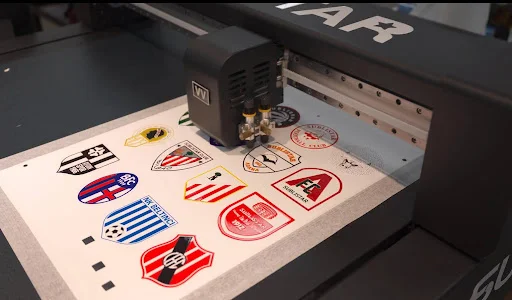
This is where the “smart” aspect shines. You take your finished roll or sheet of printed film and place it in the laser cutter. A high-quality laser machine equipped with a CCD camera system automatically scans the material. It reads registration marks printed alongside your designs to determine the exact position and orientation of the graphics.
3. Precision Cutting
Once the camera locks in the coordinates, the laser beam cuts the film. Unlike a physical blade, the laser uses thermal energy to slice through the thick layers of plastic, glue, and varnish effortlessly. It seals the edges as it cuts, preventing lifting or peeling.
Key Benefits of this Workflow
Adopting a printer-plus-laser workflow offers several distinct advantages for growing print businesses.
Unmatched Precision
Lasers can follow extremely complex paths that would be impossible for a blade or scissors. If your design has sharp angles, tiny internal cutouts, or intricate borders, the laser handles them with micrometer-level accuracy.
Speed and Automation
A laser cutter can process a sheet of stickers in a fraction of the time it takes a human. Because the camera system accounts for skew or misalignment, you can load the material, press a button, and walk away to tend to other tasks while the machine does the work.
Contactless Processing
Because there is no physical blade pressing against the material, there is no risk of the film bunching up or shifting during the cut. This is essential for maintaining the quality of the high-gloss varnish finish on UV DTF prints.
Scale Your Production Capabilities
The combination of UV DTF printing and laser cutting represents the future of short-run and medium-run customization. It allows businesses to say “yes” to complex orders and tight deadlines without worrying about the finishing process. By automating the cutting stage, you transform a labor-intensive craft into a streamlined manufacturing process.
If you are ready to upgrade your shop’s capabilities, it is time to look at the equipment that makes this workflow possible. Visit the SUBLISTAR website today to learn more about their advanced UV DTF printers and compatible laser cutting solutions.